Jobscan Information for Faculty
NOW AVAILABLE!
Jobscan is WGU students’ one-stop shop for résumé and LinkedIn optimization, cover letter creation, and job application tracking. Whether they’re applying for their first role or making a career change, Jobscan helps students get noticed and land more interviews!
Students can log in and learn more here:
How Does Jobscan Help Students?
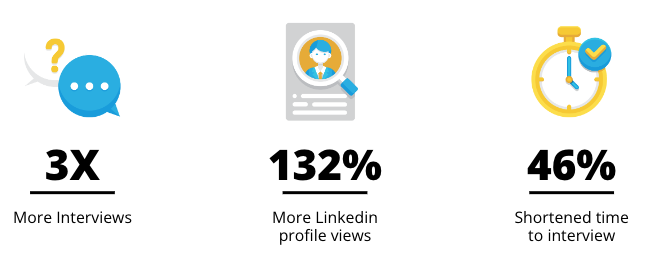
WGU students/alumni get free access to Jobscan Premium, which allows them to:
- Tailor résumés to each job
Compare their résumé against any job, receive a match score, and get real-time feedback to tailor it for specific roles and Applicant Tracking Systems.
- Discover opportunities faster
Save jobs directly to their profile and tailor their résumé on the spot. The Jobscan Chrome Extension makes it easy to save jobs from external job boards.
- Keep track of job applications
Track their applications, interviews, and offers in one central place.
- Optimize LinkedIn profiles
Scan their LinkedIn profile to see how well it matches the jobs they want and receive suggestions to improve visibility.
- Generate cover letters in seconds
Use AI to create a tailored cover letter draft that can be personalized for each application.
Sample Résumé Scan
- When students upload a résumé and job posting, they’ll receive a match rate that indicates how well their résumé aligns with the job.
- The detailed match report highlights missing skills and keywords they can add to their résumé to improve their score.
- Students should aim for a match rate of 75%.

- “I wanted to tell you about Jobscan. It’s a free tool that can help you tailor your résumé to job postings, make your LinkedIn profile stronger, and keep track of the jobs you are applying to. You can get started here: Jobscan
- “If you’ve been sending out applications and not hearing back, Jobscan can help. It shows how well your résumé matches a job posting and gives tips to improve it. It only takes a few minutes to scan your résumé. Try it here: Jobscan
- “Before you apply to a job, use Jobscan to make sure your résumé is tailored. It’s quick, easy, and will help your application rank higher in Applicant Tracking Systems. Try it today: Jobscan
*Please note: If students need to build a résumé, we recommend they review the steps on our resume page.



Select a question below to expand and view the answer.
Jobscan’s résumé scanner analyzes your résumé against proven recruiter preferences and hidden requirements buried in the job description. It compares hard skills, soft skills, and industry buzzwords from the job listing to your résumé.
When your résumé is scanned, you’re given a match rate. Your match rate is based on these four priorities, in order:
- Hard skills
- Education level (only when an advanced degree is included in the job description)
- Job title
- Soft skills
- Other keywords
*Source: This response was pulled from Jobscan’s FAQs.
Aim for a match rateof 75%, which shows your résumé fits the job. You don’t have to hit 100%. If you do, your résumé might end up sounding unnatural or keyword-stuffed.
Paste most of the job description, especially the requirements, duties, and position overview; skip parts like salary, benefits, or irrelevant company info, as including those details might skew the keyword match analysis.
An Applicant Tracking System (ATS) is software that companies use to manage job applications. It can scan and organize résumés based on keywords, skills, experience, and other criteria. According to Jobscan, 97.8% of Fortune 500 companies use an ATS to handle applications. This means that when you apply for a job online, your résumé is usually processed by an ATS.
Yes, Jobscan’s algorithm is built around the core functionalities of real Applicant Tracking Systems. With over 300 ATS vendors in the market, Jobscan studied and identified the key features shared by the most widely used systems, especially those used by Fortune 500 companies, including Taleo, iCIMS, Jobvite, and others.
Jobscan continuously refines the algorithm to stay aligned with evolving ATS behaviors, making sure you get the most accurate and actionable scan results.
*Source: This response was taken from Jobscan’s FAQs.
Yes. If you paste the job posting URL into the Match Report, Jobscan can often identify the company’s ATS. When it knows the system, it gives you tips specific to that ATS so you can adjust your résumé more effectively.
Jobscan—and most ATSs—look for exact keyword matches. For example, “project management” and “managed projects” may not count as a match. Using the exact words from the job description gives your résumé a better chance of ranking higher in the ATS.
Hard skills are specific, teachable abilities like Excel, graphic design, data analysis, or project management. Soft skills are personal traits like teamwork, communication, or problem-solving.
ATSs and recruiters mostly search for hard skills, but including both types in your résumé is important to show a full picture of your strengths.
The LinkedIn match score tells you how closely your LinkedIn profile matches job descriptions for your target roles. Try for a score of at least 80% to get better visibility with recruiters.
Yes, Jobscan can help you generate a cover letter, but it’s best to use it as a starting point. You should personalize the letter so it fits the job and highlights your unique strengths.
After running a résumé scan, locate the Cover Letter tab within the Power Edit feature in the Match Report. Watch this brief video tutorial for more information: AI-Powered Cover Letter Generator.
Yes! Jobscan strictly follows its data privacy policy. Your personal information is never shared with third parties, such as recruiters, without your consent. All data stays securely within Jobscan’s system, which uses industry-standard encryption.
Open this link for more detailed information: Jobscan Privacy Policy
For more FAQs, visit Jobscan’s FAQ page.